What the heck is an audio decision model?
It isn't a transcriber and it isn't a chatbot. An audio decision model listens to a conversation and answers questions about it, fast, with a probability attached. Here's what that means and where it's useful.
An audio decision model listens to audio and answers a question about it. Is the caller done talking? Which language are they speaking? Did they just read out their date of birth? The answer comes back as a choice with a probability attached, fast enough to act on while the conversation is still happening.
If you build voice AI, your agent already makes dozens of these calls on every conversation, usually with a pile of separate tools: a silence timer here, a regex there, an LLM prompt for the rest. This post explains what an audio decision model is, how it differs from the models you already use, and the decisions it can take off your hands.
What is an audio decision model?
It takes three things in:
- Audio. A live stream or a recording: the caller, the agent, or both.
- A question, in plain words. “Has the caller finished speaking?”
- The possible answers, which you define with the question.
And it gives one thing back: an answer, in one of three shapes.
- Yes or no. “Is a person on the line?” Yes, 0.97.
- Pick one. “Which language is this?” Hindi 0.88, English 0.10, Tamil 0.02.
- A score. “How frustrated does the caller sound, from 1 to 5?” Most likely 4.
Every answer comes with a probability, so your code decides how sure is sure enough.
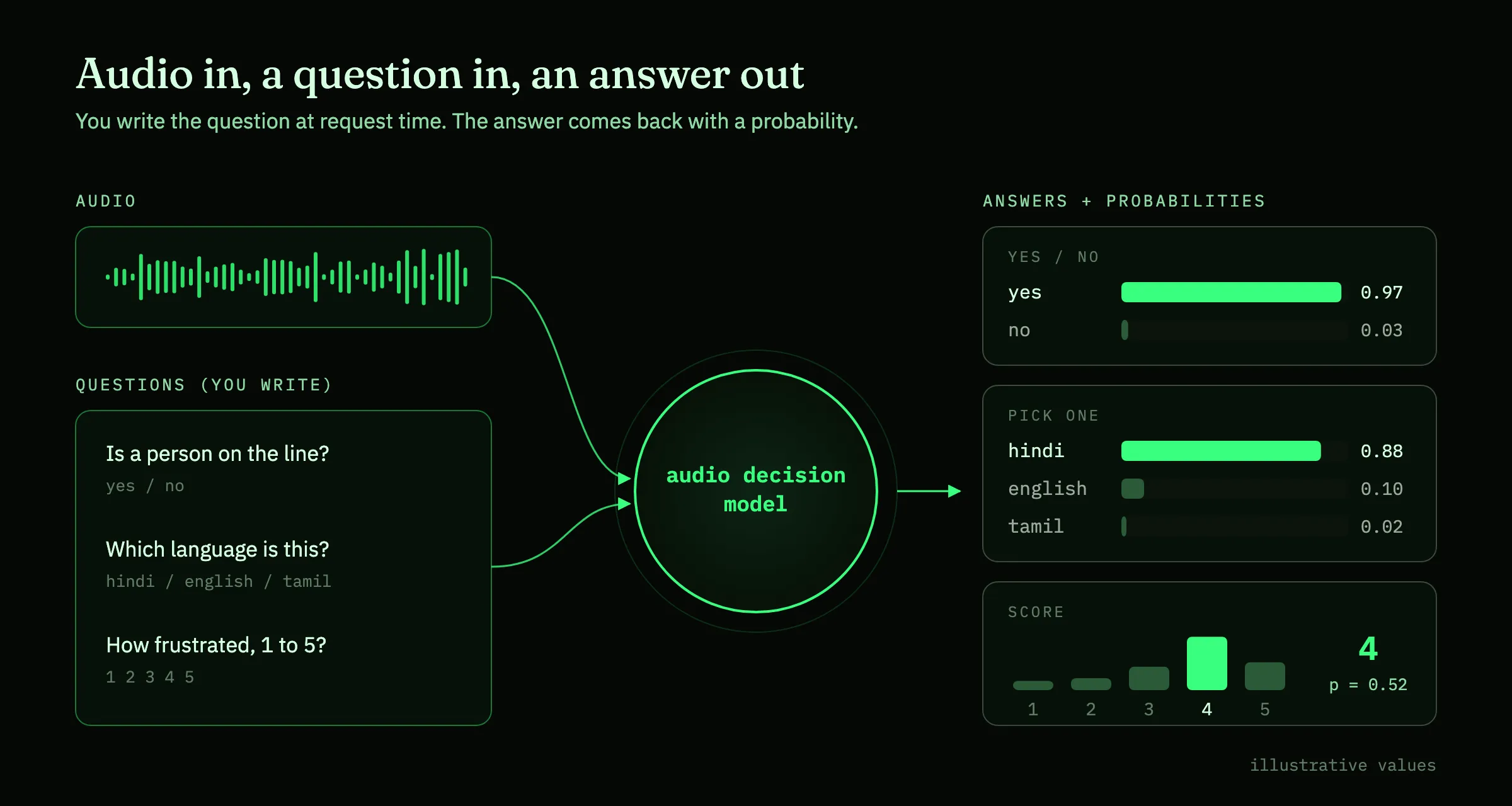
The important part is that the question is an input. Most audio models are trained to answer one fixed question. A voice activity detector (VAD) only knows speech from not-speech. An emotion classifier only knows emotions. An audio decision model takes the question at request time, so the same model can answer the turn-taking question, the language question and the frustration question about the same second of audio. A new decision is a new question, not a new model.
Why decide from audio and not the transcript?
Most voice stacks turn speech into text first and make every decision on the text. That throws away most of what a decision needs.
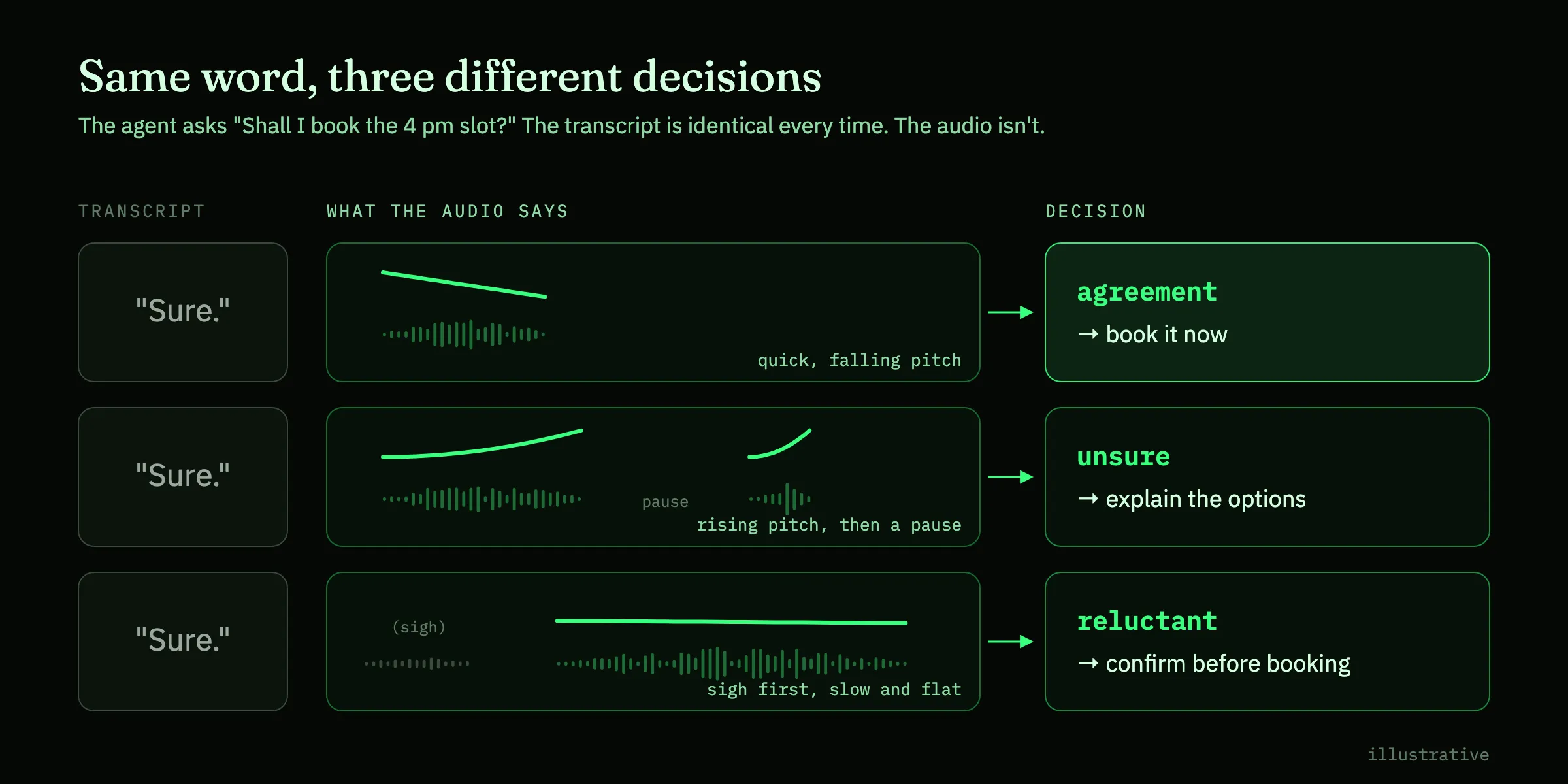
- How it was said. “Sure” can mean yes, maybe or whatever. The difference is in pitch, pace and hesitation, and none of it survives transcription.
- Who said it. A transcript flattens every voice into one line. The person in the room, the TV and the hold music all become “the caller”.
- Everything that isn’t a word. Sighs, laughter, long pauses, a voicemail beep, a baby crying, a line breaking up.
- Time. A transcript lands after the words are spoken, and a text model adds its own delay on top. People leave about 200 ms between turns.
What an audio decision model is not
| Takes in | Gives back | |
|---|---|---|
| STT | Audio | Words |
| LLM | Text | Replies, tool calls |
| TTS | Text | Audio |
| VAD, emotion model | Audio | One fixed label |
| Audio decision model | Audio and a question | An answer and a probability |
It doesn’t write replies, and it doesn’t replace your LLM. It sits next to your stack and handles the small, frequent, time-critical calls that the LLM is too slow for and can’t hear. We wrote about why that layer is missing from most stacks in the missing piece in the voice AI stack.
What can an audio decision model decide?
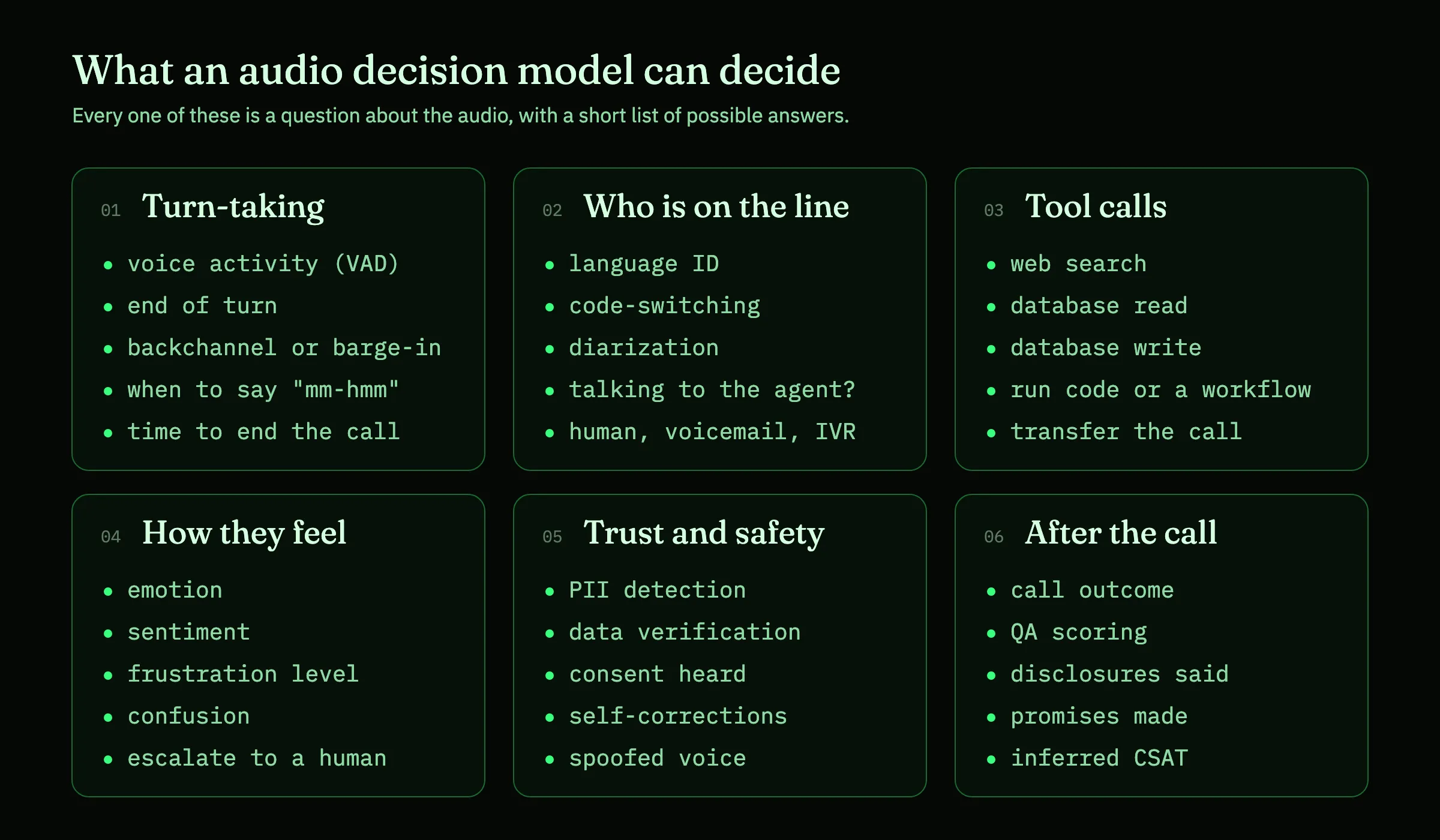
Short answer: anything you can phrase as a question about the audio with a short list of answers. In a voice agent, those questions fall into six groups.
Turn-taking: when to speak and when to wait
- Voice activity detection (VAD). Is that sound speech, or a cough, a keyboard or the TV? It’s the first decision in every voice pipeline, and today it’s often the only one made from audio.
- End-of-turn detection. Is the caller done, or mid-thought? “My account number is… uh…” should get silence. “What time do you close?” should get an answer right away.
- Backchannel or barge-in. While the agent is talking, “mm-hmm” means keep going and “wait, no” means stop now. Same volume, opposite decisions.
- When to backchannel. During a long explanation, a well-timed “mm-hmm” from the agent tells the caller it’s still listening.
- Ending the call. “Great, that’s everything, thanks” means wrap up, not “Is there anything else I can help with?”
There’s more on these in Ask what the moment needs.
Who is on the line, and in what language
- Language ID. Pick the right STT and TTS from the first second, instead of asking “English or Hindi?”
- Code-switching. Notice when a caller moves between languages mid-sentence, and follow them.
- Diarization. Who spoke when: the caller, the agent, or a second person on speakerphone. Useful live, and for clean transcripts afterwards.
- Talking to the agent, or not? A caller who turns to say “one sec, the delivery guy is here” doesn’t need an answer. The same question works for smart speakers and in-car assistants: was that meant for the device?
- Person, voicemail or phone menu. On outbound calls, is a human there, a voicemail greeting, or an IVR? If it’s voicemail, when is the beep? If it’s hold music, has a person come back?
- Line conditions. Heavy noise, a bad connection or a caller on speaker in a car. The agent can keep replies short, read numbers back twice or offer to text a link.
Tool calls: when to act
An LLM decides which tool to call. It can’t tell you when the caller has said enough to call it, or whether “yeah” was a real yes. An audio decision model can, for each kind of tool:
- Web search. “What’s the weather like in Goa this weekend?” Once the question is complete and clearly needs fresh information, the search can start, even before the caller stops talking.
- Database read. Once the order number has been read out in full, and the last digit lands with a falling, final tone rather than an “uh”, fire
get_order_status. Starting safe lookups early is the idea behind speculative tool calling. - Database write. Bookings, address changes, refunds. Here the question is “has the caller clearly confirmed?”, and “yeah… I guess?” shouldn’t pass.
- Process or code execution. Run a calculation, kick off a workflow, send an SMS or start a payment. “Can you split this across three cards?” is a cue to run code, not to keep chatting.
- Call transfer. Is this a request the agent can handle, or one that needs a specialist queue right now?
How the caller feels
- Emotion and sentiment. Calm, confused, annoyed, angry, pleased. Scored every turn, not once at the end, so the agent can slow down, apologize or simplify while it still matters.
- Frustration level. A 1 to 5 score is more useful than a label. A caller at 2 needs patience. A caller at 4 who has repeated the same request twice needs something to change.
- Confusion. A long pause after an explanation, or a hesitant “okay…?”, is a cue to rephrase before moving on.
- Escalation to a human. Combine the above and hand off before the caller has to ask for a person.
- Urgency and distress. In healthcare, insurance or emergency lines, a caller who sounds distressed can be routed first, whatever words they use.
Trust, privacy and safety
- PII detection. The caller starts reading out a card number, a date of birth or an ID number. Pause the recording, mask the transcript and keep it out of logs, ideally before the last digit is spoken.
- Data verification. Turn verification into a pick-one question. Read the options from your database (“15 March 1990”, “15 May 1990”, “none of these”) and ask which one the caller said. The same works for “did the caller confirm the read-back?”
- Consent. Did the caller actually agree to the recording or the terms, or just make a noise while the agent moved on?
- Self-corrections. “4-8-2-1… sorry, 4-8-1-2.” Catch the correction so the wrong value never reaches a form or a tool.
- Spoofed voices. Does this sound like a live person, or a recording or a cloned voice? Treat it as a signal for a second check, not as proof.
After the call
The same model works on recordings, where speed matters less and coverage matters more.
- Call outcome. Sale, callback, not interested, wrong number, do-not-call.
- QA scoring. Did the agent verify identity, resolve the issue and close properly? Score every call, not a 2% sample.
- Disclosures. Was the required recording or compliance notice actually said?
- Promises. Did the agent commit to a callback, refund or follow-up? Flag it so someone keeps the promise.
- Inferred satisfaction. How did the caller sound at the end? It’s a useful stand-in when almost nobody answers the survey.
One call, many decisions
On a real call, these questions don’t arrive one at a time. Here’s a 30-second call about a late order, with every decision a voice agent has to make along the way.
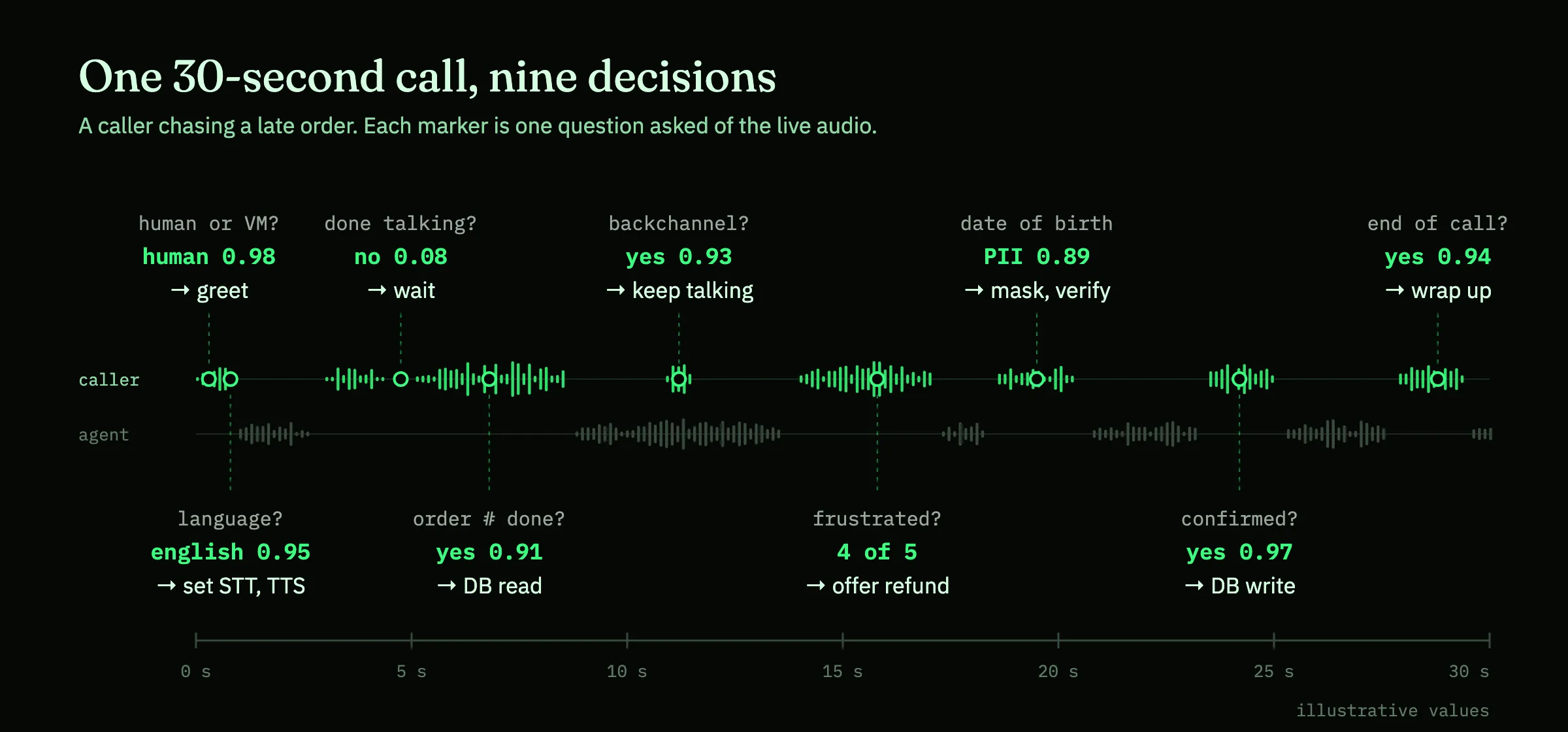
Nine decisions in 30 seconds, and most of them happen while someone is still talking. Today they’re spread across a VAD, a silence timer, an answering machine detector, an LLM prompt and a regex for card numbers. Each was tuned on its own, so sooner or later they disagree. Ask one model the questions about the same audio, and they share one view of the conversation.
Why the probability matters
Not every mistake costs the same. Masking a number that wasn’t sensitive costs nothing. Refunding an order on a mumbled “yeah” costs money. So each decision needs its own bar.
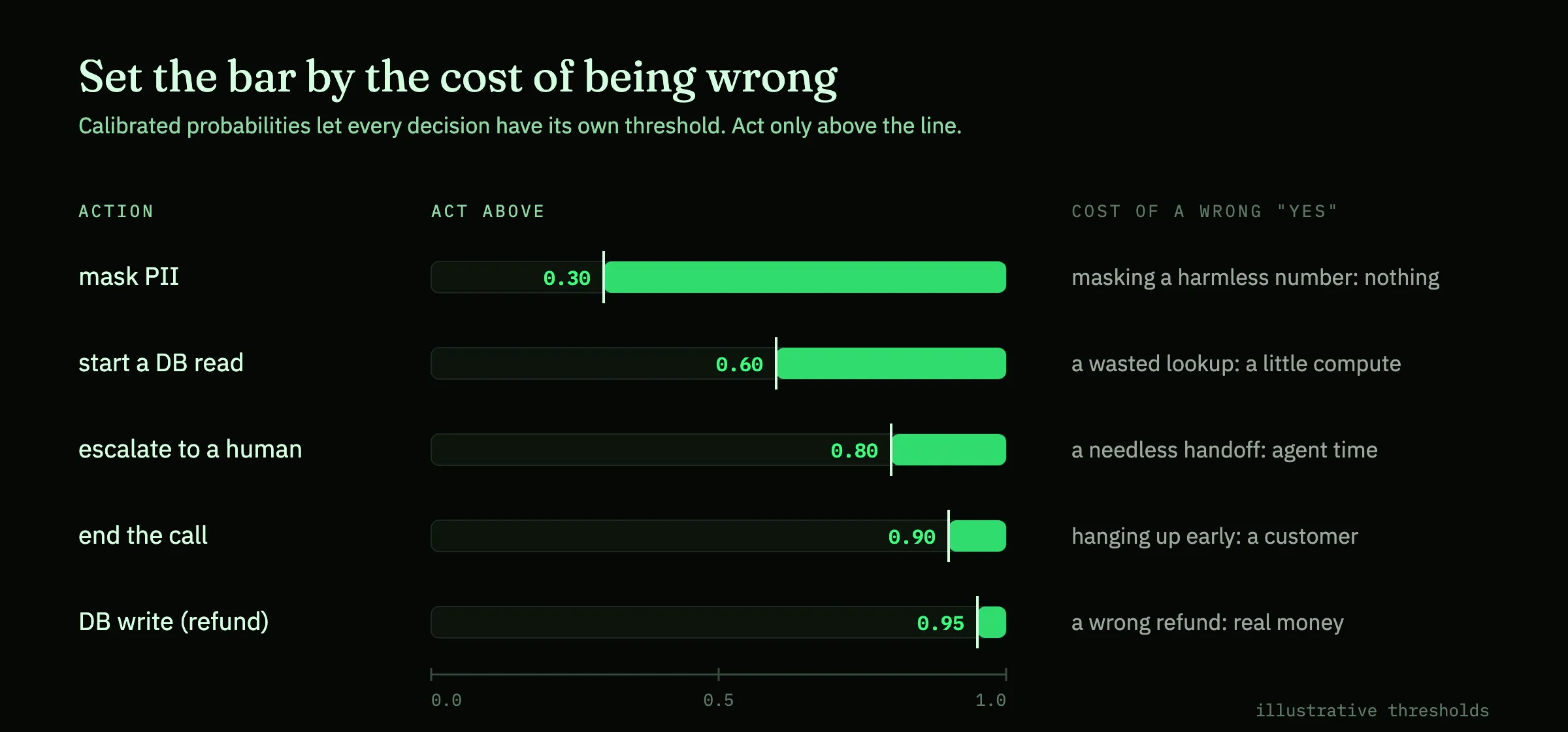
That only works if the probabilities are calibrated: when the model says 0.8, it should be right about 80% of the time. Then a threshold means something, and you can move it per action, per customer or per use case without retraining anything.
How to start using an audio decision model
- List every decision your agent makes today, and what makes it: a timer, a regex, an LLM prompt or a separate model.
- Start with the ones that hurt. Usually that’s cutting callers off, missed escalations and slow tool calls.
- Write each one as a question with a fixed set of answers. If you can’t, it probably belongs to the LLM.
- Run it in shadow mode next to your current logic, and compare on your own calls.
- Set a threshold per decision from those results, starting strict for anything that writes data or ends a call.
That’s the whole idea: audio in, your question in, an answer you can act on. It’s also what we’ve been building at Tazo.
A transcript tells you what was said. An audio decision model tells you what to do about it.